Automating Data Extraction from Invoices, Forms, and Documents: How Businesses Save Hundreds of Hours Every Month
- ⏰ August-21-2026 |
- ✍️ By Admin |
- 🏷️ In Data Automation
Businesses handle large volumes of invoices, application forms, purchase orders, receipts, contracts, reports, and other documents every day. Extracting information from these documents manually can consume significant time and require employees to perform repetitive data-entry tasks. Even a small mistake in entering an invoice number, customer name, date, or payment amount can create problems later in the workflow.
Automated data extraction provides a smarter way to handle this process.
Using technologies such as Optical Character Recognition (OCR), Artificial Intelligence (AI), Machine Learning, and intelligent document processing, businesses can automatically identify and extract relevant information from structured and unstructured documents.
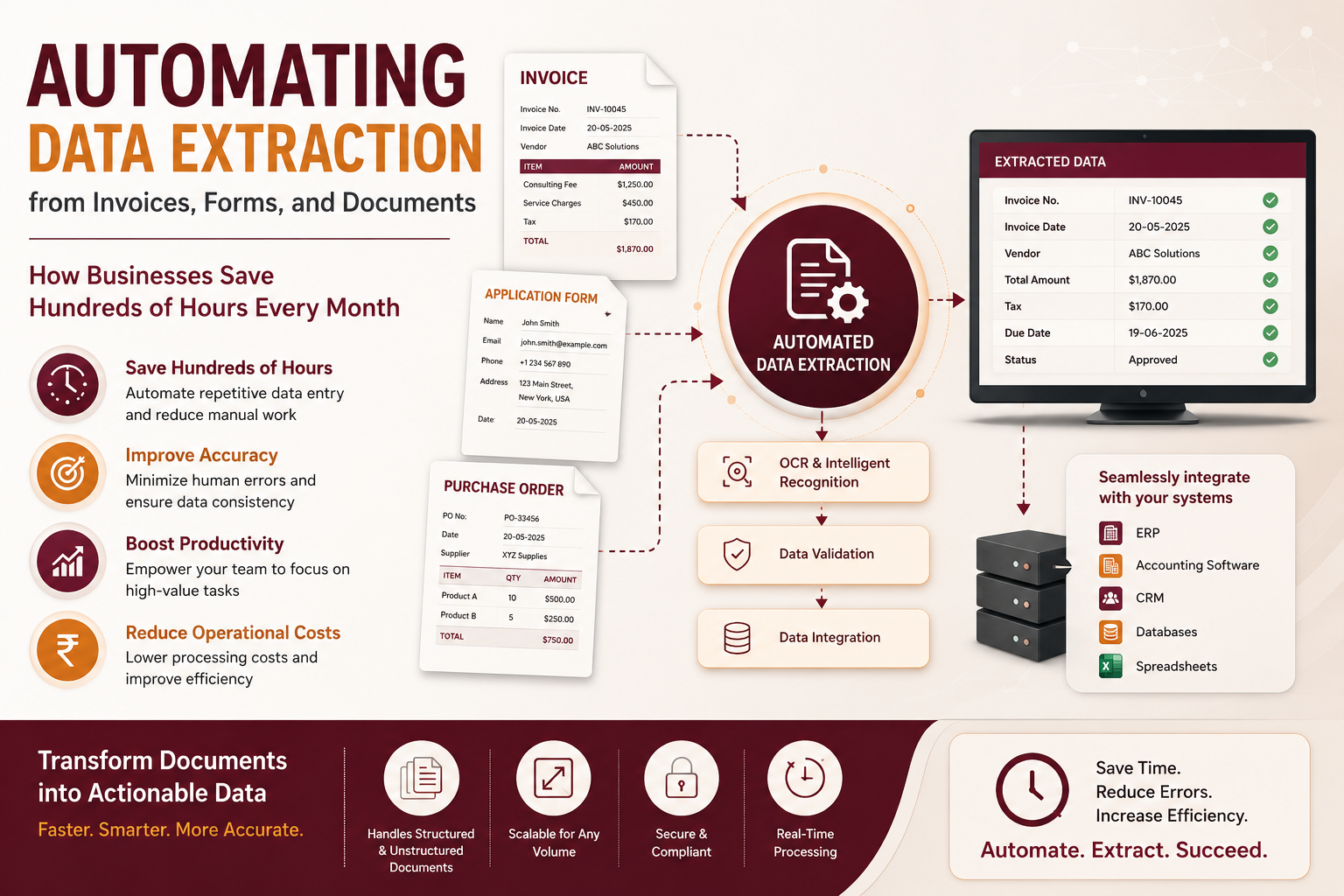
For example, an automated system can process an invoice and capture details such as the vendor name, invoice number, invoice date, tax amount, total amount, and payment information. The extracted information can then be transferred directly into accounting software, databases, spreadsheets, or business applications.
One of the biggest advantages is time savings. Employees no longer need to spend hours copying information from documents into different systems. Automation can process large volumes of documents much faster, allowing employees to focus on activities that require human judgment and decision-making.
Automated extraction can also help reduce data-entry errors. Manual processing can result in incorrect numbers, duplicate entries, missing fields, or misplaced information. Automated workflows can apply predefined rules and validation checks to identify incomplete or inconsistent data before it moves to the next stage.
Another major benefit is faster business processing. For industries such as finance, insurance, healthcare, logistics, and retail, documents often need to be processed quickly. Automating extraction allows businesses to move information through their workflows faster and respond to customers and partners without unnecessary delays.
How Automated Data Extraction Works
A typical workflow involves several stages:
1. Document Collection:
Invoices, forms, PDFs, scanned documents, and images are collected from email, cloud storage, applications, or other sources.
2. Document Recognition:
The system identifies the document type and determines which information needs to be extracted.
3. Data Extraction:
OCR and AI-based technologies identify relevant text, numbers, tables, and other data fields.
4. Data Validation:
Extracted information can be checked against predefined rules to identify missing or incorrect values.
5. Data Integration:
Validated information is transferred into ERP systems, CRM platforms, accounting software, databases, or other business applications.
Where Businesses Can Use It
Automated data extraction can support many business functions, including:
- Invoice and receipt processing
- Insurance claim processing
- Customer registration forms
- Purchase orders
- Financial documents
- Medical records
- Shipping and logistics documents
- Employee and HR forms
- Surveys and applications
- Contracts and business reports
The Business Impact
The real value of automation goes beyond simply reducing data-entry work. It can help businesses process more documents without increasing their administrative workload, improve consistency, accelerate workflows, and make information available faster.
For companies processing thousands of documents every month, even a few minutes saved on each document can result in hundreds of hours saved over time.
Automated data extraction therefore offers businesses an opportunity to transform document-heavy processes into faster, more reliable, and scalable digital workflows. By combining AI, OCR, validation, and workflow automation, organizations can spend less time on repetitive data entry and more time on productive business activities.