Bad Data In, Bad Decisions Out: How Automated Data Validation Protects Your Business
- ⏰ August-18-2026 |
- ✍️ By Admin |
- 🏷️ In Data Automation
In today's digital business environment, data is at the heart of almost every important decision. From customer information and financial records to inventory, insurance data, and business reports, organizations depend on accurate data to keep their operations running smoothly.
But what happens when the data entering these systems is incorrect?
A misspelled name, duplicate customer record, missing value, incorrect date, invalid email address, or inconsistent format may appear to be a small issue. However, when these errors are repeated across thousands or millions of records, they can affect reports, workflows, customer experiences, and business decisions.
This is where automated data validation becomes important.
What Is Automated Data Validation?
Automated data validation is the use of software, rules, and automated processes to check whether incoming data meets predefined requirements before it is accepted, stored, or used.
Instead of relying entirely on employees to manually review every record, automated validation can check data continuously and flag or reject information that does not meet the required standards.
For example, an automated system can check whether:
- Required fields have been completed
- Email addresses follow a valid format
- Dates are entered correctly
- Numbers fall within an expected range
- Duplicate records exist
- Data follows a specific format
- Information matches predefined rules
- Values are consistent across different systems
This creates an important quality checkpoint between data collection and data usage.
Why Does Data Validation Matter?
Businesses often collect information from multiple sources, including websites, applications, forms, APIs, databases, spreadsheets, and third-party platforms.
Each source may use a different format or contain different levels of accuracy.
Without proper validation, incorrect information can move through the entire workflow.
For example:
Customer submits information → Data enters CRM → Automated process runs → Report is generated → Management makes a decision
If the original customer information is incorrect, every step after it can potentially be affected.
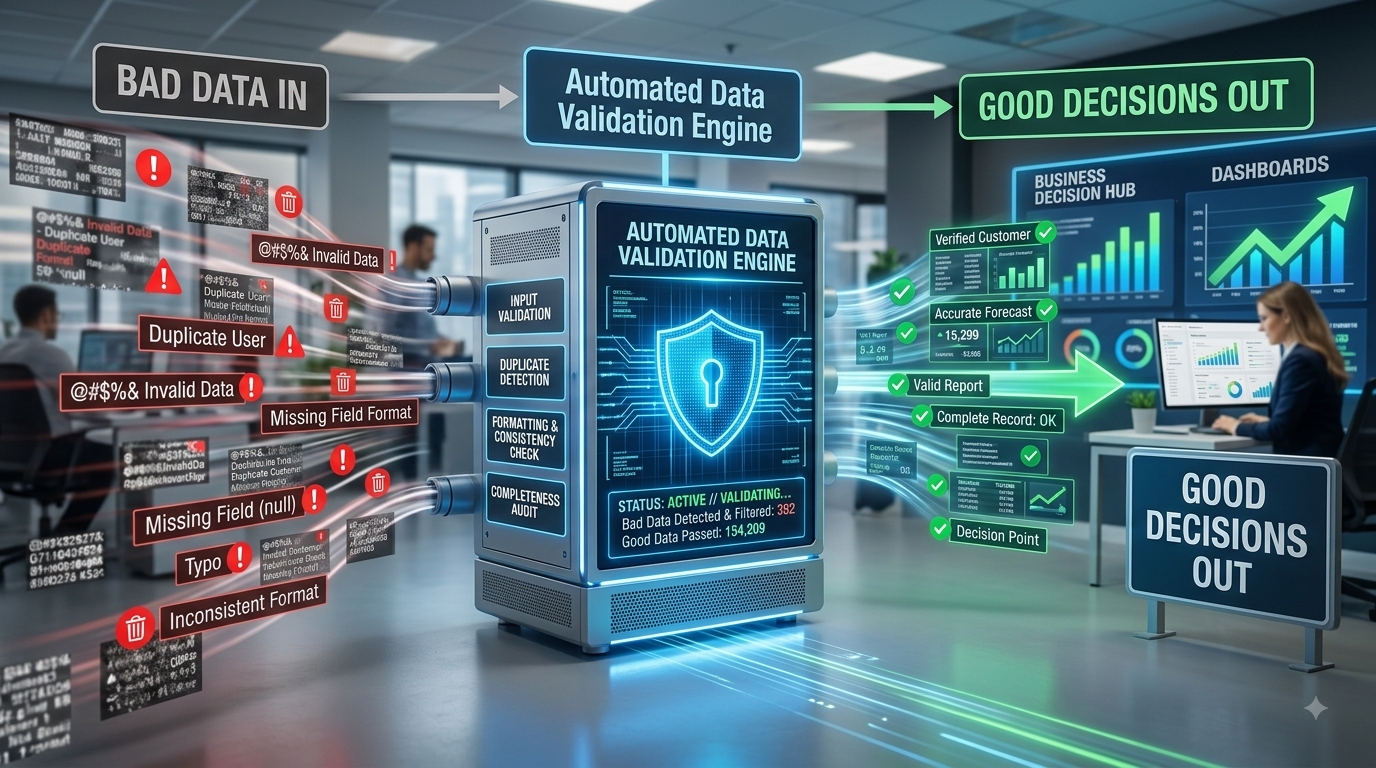
This is why the principle “Bad Data In, Bad Decisions Out” matters.
Automation can make a process faster, but automation does not automatically guarantee that the information being processed is correct. Data automation works best when quality checks are built into the workflow. FingerLinks itself describes data automation as a way to improve efficiency and accuracy while reducing manual intervention.
Common Data Problems Businesses Face
Some of the most common problems that automated validation can identify include:
1. Missing Information
A customer record may be submitted without a phone number, email address, address, or other required field.
Automated validation can identify incomplete records before they enter the next stage of processing.
2. Incorrect Formats
Different users may enter the same information in different formats.
For example:
01/08/2026
August 1, 2026
2026-08-01
A validation system can standardize acceptable formats and flag entries that do not follow the required structure.
3. Duplicate Records
Duplicate customer or transaction records can affect reporting and create unnecessary work.
Automated checks can compare selected fields and identify potential duplicates before they are added to a database.
4. Invalid Values
A field may contain information outside an expected range.
For example, an age field containing 250 or a quantity field containing -50 could be automatically flagged.
5. Inconsistent Data
One system might record a country as USA, while another uses United States and another uses US.
Automated validation and standardization can help maintain consistency across systems.
How Automated Data Validation Works
A typical automated validation workflow can be structured into several stages:
Data Collection → Validation Rules → Error Detection → Correction/Review → Approved Data → Processing
When new information enters the system, predefined rules are automatically applied.
If the information meets the requirements, it can continue through the workflow.
If an error is detected, the system can:
- Reject the record
- Flag it for review
- Send an alert
- Request correction
- Route it to a specific team
- Automatically correct certain known formatting issues
The appropriate approach depends on the type of data and the business process.
Automated Data Validation vs. Data Cleaning
These two concepts are closely related but serve different purposes.
Data validation primarily asks:
“Is this data acceptable according to our rules?”
Data cleaning generally focuses on:
“How can we correct or improve problematic data?”
For example, validation may identify that a phone number does not follow the required format. A subsequent cleaning process may standardize the number.
Using both approaches together can create a stronger data quality workflow.
FingerLinks has previously addressed automated data cleaning, transformation, and preprocessing, including issues such as missing values, inconsistent formats, duplicates, and human errors. Automated validation complements these processes by providing an earlier quality checkpoint.
Where Can Businesses Use Automated Data Validation?
Automated validation can be useful across many industries and departments.
Healthcare
Healthcare organizations handle large amounts of sensitive information. Validation can help identify incomplete or incorrectly formatted records before they move into downstream systems.
Insurance
Insurance companies process customer information, policy details, claims, and other structured data. Automated checks can help identify missing or inconsistent information during processing.
Banking and Finance
Financial organizations depend heavily on accurate transaction and customer data. Validation can support data consistency and help identify records that require additional review.
E-commerce
Online businesses constantly process customer, product, payment, and order information. Automated validation can help prevent incomplete or inconsistent records from affecting order processing.
Customer Relationship Management
CRM systems contain valuable customer information. Automated validation can help maintain cleaner databases by identifying incomplete, duplicate, or incorrectly formatted records.
Key Benefits of Automated Data Validation
Improved Accuracy
Automated rules can consistently check data against predefined requirements, reducing the possibility of overlooked errors.
Reduced Manual Work
Employees do not need to manually inspect every record. Instead, they can focus on exceptions and records that require human judgment.
Faster Processing
Automated validation can check large volumes of information quickly, helping businesses maintain efficient workflows.
Better Decision-Making
Reliable data provides a stronger foundation for reports, analytics, forecasting, and business decisions.
Improved Customer Experience
Accurate customer information can help reduce communication errors, processing delays, and repeated requests for information.
Greater Scalability
As data volumes increase, manually checking every record becomes increasingly difficult. Automated validation allows businesses to apply consistent checks across larger datasets.
The Role of AI in Data Validation
Traditional validation typically relies on predefined rules. AI can add another layer of intelligence by identifying patterns and unusual data that may not be covered by simple rules.
For example, an AI-powered system could identify unusual patterns in customer records or flag information that appears inconsistent with historical data.
However, AI should not replace business rules and human oversight completely. For sensitive or high-impact processes, organizations should establish appropriate review mechanisms.
The strongest approach can combine:
Business Rules + Automation + AI + Human Oversight
This creates a more flexible and reliable data quality process.
What Happens When Validation Is Missing?
When businesses allow inaccurate information to move freely through their systems, the consequences can extend beyond a single incorrect record.
Poor-quality data can result in:
- Incorrect reports
- Repeated manual corrections
- Delayed workflows
- Duplicate records
- Poor customer communication
- Inefficient operations
- Increased processing costs
- Unreliable business insights
The problem becomes even more significant when automated systems process large amounts of incorrect information at high speed.
Automation without data quality controls can simply make mistakes happen faster.
Building a Better Data Quality Workflow
Businesses considering data validation automation should begin by identifying where errors commonly enter their workflows.
A practical approach is to:
- Identify important data sources.
- Document common data errors.
- Define validation rules.
- Automate routine checks.
- Create alerts for exceptions.
- Establish human review where necessary.
- Monitor validation results.
- Regularly update rules as business requirements change.
This approach allows organizations to introduce automation while maintaining appropriate quality controls.
How FingerLinks Infotech Can Help
At FingerLinks Infotech LLP, data automation services are designed to help businesses streamline data processing, reduce manual intervention, and improve operational efficiency. The company provides customized automation solutions involving data entry, process handling, reporting, and integration functions.
Automated data validation can become an important component of these workflows by helping businesses identify data issues before they affect downstream processes.
Whether the requirement involves data collection, processing, validation, transformation, reporting, or workflow automation, the right combination of technology and quality controls can help businesses build more reliable data processes.
Conclusion
Data is only as valuable as its quality.
Businesses can invest in sophisticated analytics, AI systems, dashboards, and automation platforms, but inaccurate input data can undermine the results.
Automated data validation provides an important first line of defense.
By checking information before it moves further through a workflow, businesses can reduce errors, minimize manual intervention, improve consistency, and create a stronger foundation for decision-making.
Because when it comes to business data, the goal isn't simply to process information faster.
It is to process the right information accurately.