Connecting the Data Silos: How Automated Data Integration Brings CRM, ERP & Business Systems Together
- ⏰ August-25-2026 |
- ✍️ By Admin |
- 🏷️ In Data Automation
In modern businesses, data is generated everywhere. Customer information is stored in CRM platforms, financial records are maintained in ERP systems, employee information may exist in HR software, while sales, inventory, marketing, and operational data can be spread across multiple applications and databases.
When these systems operate independently, businesses create data silos. Employees may have access to only part of the information they need, teams may maintain separate spreadsheets, and the same data may have to be entered into multiple systems. This creates unnecessary work and increases the possibility of errors.
Automated data integration provides a solution by connecting different systems and enabling information to move between them automatically.
What Are Data Silos?
A data silo occurs when information is isolated within a particular department, application, database, or business system.
For example, a sales team may maintain customer information in a CRM, while the finance department manages billing information in an ERP system. If these platforms are not connected, employees may need to manually transfer customer and transaction details between systems.
This can result in:
- Duplicate data entry
- Outdated information
- Inconsistent records
- Manual reconciliation
- Delayed reporting
- Increased operational costs
- Higher risk of human errors
As organizations grow, managing these disconnected systems becomes increasingly difficult.
How Automated Data Integration Works
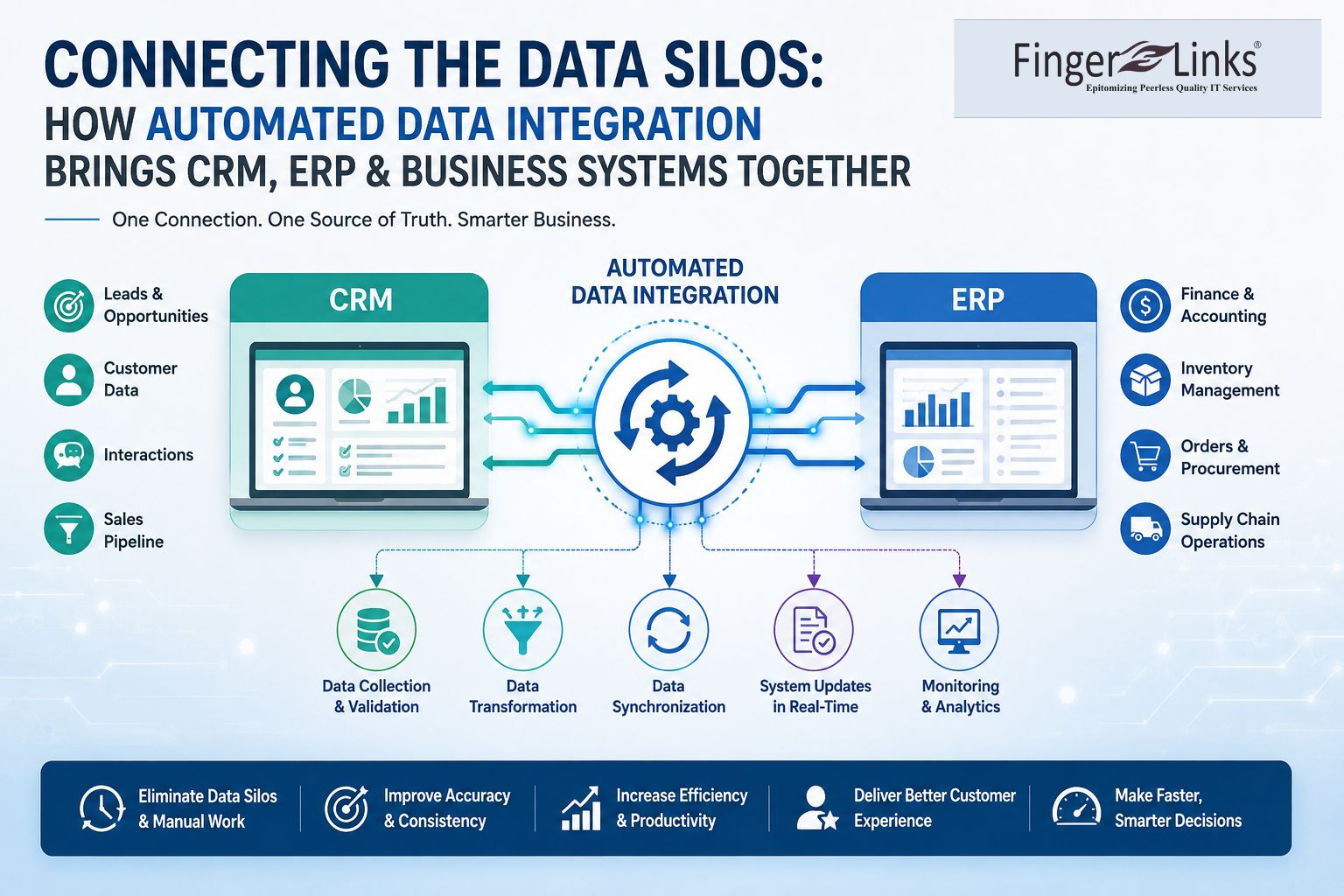
Automated data integration establishes connections between different applications and enables data to flow between them based on predefined rules and workflows.
For example, when a sales representative adds a new customer to a CRM, an automated integration workflow can transfer relevant customer information to the ERP, billing, customer-support, or marketing system.
A typical automated integration process includes:
Data Collection → Data Validation → Data Transformation → Data Synchronization → System Update → Monitoring
The integration process can be configured to run continuously, at scheduled intervals, or whenever a specific event occurs.
Connecting CRM and ERP Systems
CRM and ERP platforms contain different but closely related business information.
A CRM generally manages areas such as:
- Customer profiles
- Leads and prospects
- Sales opportunities
- Communication history
- Customer interactions
An ERP commonly manages:
- Finance and accounting
- Inventory
- Procurement
- Orders
- Billing
- Supply chain operations
Connecting these systems allows customer and business information to move between sales, finance, inventory, and operations without repeated manual entry.
For example, when a customer places an order, an integrated workflow can automatically update the CRM, send order information to the ERP, update inventory records, and trigger the appropriate billing process.
Benefits of Automated Data Integration
1. Eliminates Repetitive Data Entry
Employees no longer need to manually copy the same information between multiple applications. Automation allows systems to exchange data directly.
2. Improves Data Accuracy
Automated workflows reduce the errors commonly associated with manual copying, typing, and spreadsheet-based processes.
3. Creates a Consistent View of Data
When systems share synchronized information, different departments can work with more consistent and current records.
4. Saves Time and Operational Costs
Automation reduces repetitive administrative work, allowing employees to spend more time on activities that require human judgment and business expertise.
5. Enables Faster Reporting
Integrated systems can provide information to reporting and analytics platforms more efficiently, helping management access relevant business data faster.
6. Improves Customer Experience
When customer information is available across relevant systems, employees can respond more quickly and provide more consistent service.
Common Business Systems That Can Be Integrated
Automated integration is not limited to CRM and ERP platforms. Businesses can connect a wide range of systems, including:
- CRM platforms
- ERP software
- Accounting systems
- HR and payroll platforms
- Inventory management systems
- E-commerce platforms
- Marketing automation tools
- Customer-support applications
- Databases
- Cloud applications
- Business intelligence platforms
This creates a connected data environment where information can move between systems with minimal manual intervention.
Data Integration and Data Automation
Data integration and data automation work closely together.
Data integration focuses on connecting systems and enabling information to move between them.
Data automation uses those connections to create workflows that perform tasks automatically.
For example, integrating an e-commerce platform with an ERP system allows order information to move between the systems. Automation can then use that connection to trigger inventory updates, invoice generation, customer notifications, and reporting.
Together, integration and automation can significantly reduce manual business processes.
Challenges Businesses Should Consider
Although automated integration offers significant benefits, businesses should plan carefully before connecting multiple systems.
Important considerations include:
- Data security
- Access permissions
- Data quality
- Different data formats
- System compatibility
- API availability
- Data validation
- Error handling
- Monitoring and maintenance
A successful integration strategy should ensure that information is transferred accurately, securely, and according to business requirements.
The Future of Connected Business Data
As businesses adopt more cloud applications and digital platforms, the number of systems generating and consuming data continues to increase. Maintaining isolated systems can make business operations slower and more difficult to manage.
Automated data integration helps create a connected environment where information can move efficiently between applications. Combined with data validation, workflow automation, analytics, and AI-powered processing, integration can become an important part of a modern data strategy.
Conclusion
Data silos can limit productivity, create inconsistent information, and make it harder for organizations to respond quickly to business needs. Automated data integration connects CRM, ERP, databases, and other business applications so information can flow between systems with less manual intervention.
By connecting business systems and automating data workflows, organizations can reduce repetitive work, improve data accuracy, increase operational efficiency, and provide teams with more reliable information for decision-making.
For businesses looking to modernize their operations, connecting existing systems through automated data integration can be an important step toward a more efficient and connected digital workplace.