From Raw Data to Action: How Automated Data Workflows Reduce Manual Business Processes
- ⏰ August-29-2026 |
- ✍️ By Admin |
- 🏷️ In Data Automation
Businesses today generate and handle large volumes of data every day. Customer details, sales records, invoices, forms, emails, inventory updates, reports, and operational information often come from multiple sources and systems.
When these processes are managed manually, employees may spend valuable time copying data, checking records, updating spreadsheets, transferring information between systems, and following up on missing details. These repetitive activities can slow down operations and increase the possibility of errors.
This is where automated data workflows can make a significant difference.
What Is an Automated Data Workflow?
An automated data workflow is a structured process that moves data from one stage to another with minimal manual intervention. Instead of employees manually handling every step, automation can perform predefined tasks based on specific rules, triggers, and conditions.
A typical workflow may include:
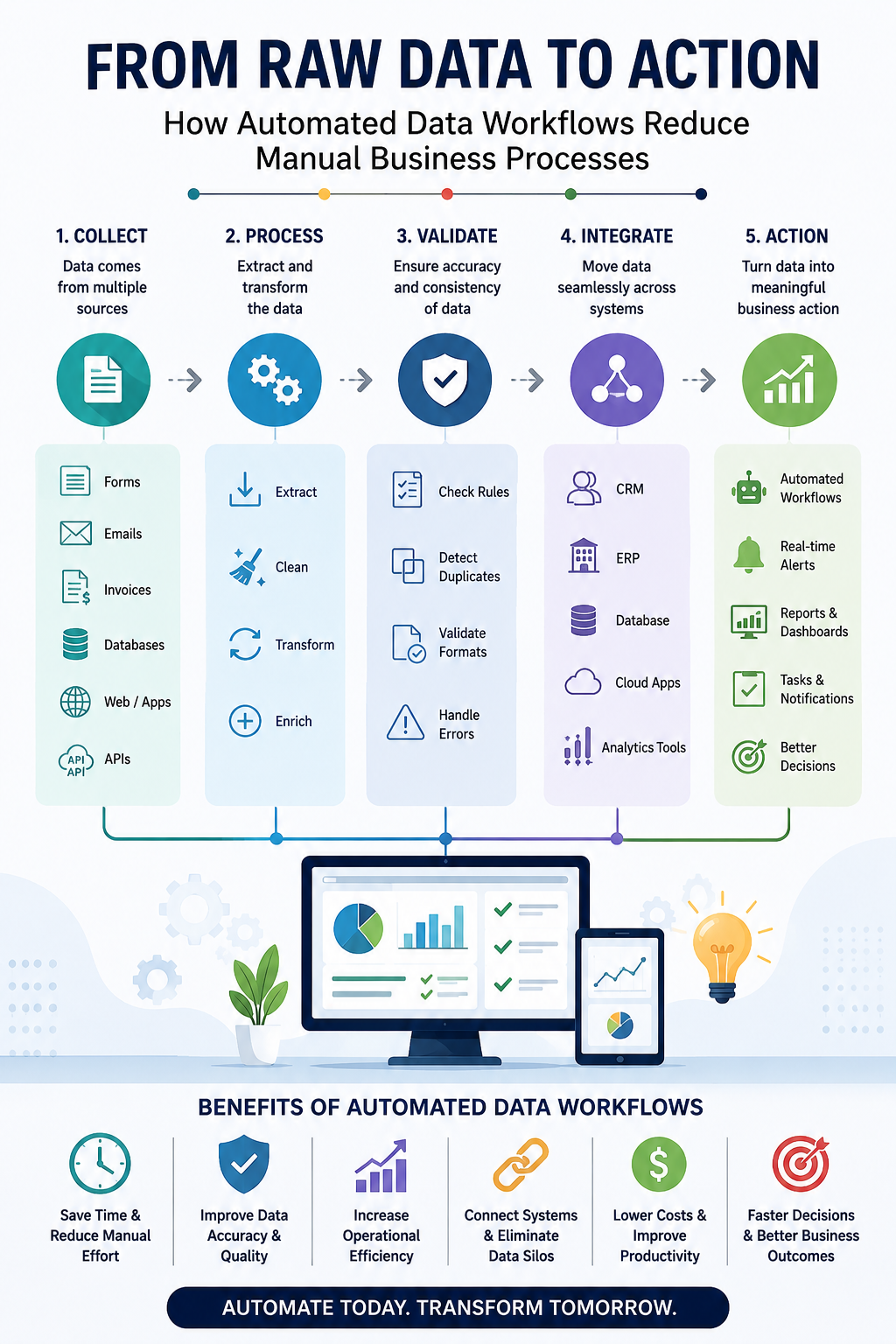
Data Collection → Data Extraction → Data Processing → Data Validation → Data Integration → Business Action
For example, customer information submitted through an online form can automatically enter a database, be checked for errors, transferred to a CRM system, and assigned to the appropriate team.
This creates a faster and more organized process.
Reducing Repetitive Manual Work
Manual data handling often involves repetitive tasks such as:
- Copying information between systems
- Updating spreadsheets
- Checking incomplete records
- Searching for duplicate information
- Creating regular reports
- Sending workflow notifications
- Updating customer or business records
Automated workflows can reduce the need for employees to perform these activities repeatedly. This allows teams to focus more on tasks that require human judgment, communication, and problem-solving.
Improving Data Accuracy
Manual data entry can lead to typing mistakes, missing information, inconsistent formats, and duplicate records.
Automation can include validation rules that check whether data meets specific requirements before moving to the next stage.
For example, a workflow can verify:
- Required fields are completed
- Email addresses follow the correct format
- Duplicate records are identified
- Data values fall within an expected range
- Information is transferred correctly between systems
These automated checks can help businesses maintain better data quality throughout the workflow.
Connecting Business Systems
Many organizations use separate systems for different business activities. A company may use one platform for customer management, another for accounting, another for HR, and additional tools for sales and operations.
When these systems are disconnected, employees may need to manually transfer information between them.
Automated data workflows can help connect these processes and ensure information moves to the appropriate system when required. This can create a more connected flow of information across the organization.
Turning Data Into Action
The purpose of automation is not simply to move data faster. The real value comes from turning data into useful action.
For example:
A new enquiry is received → The information is validated → The lead is added to the CRM → The sales team is notified → A follow-up task is created automatically.
This type of workflow reduces delays and helps ensure that important actions are not missed.
Monitoring Automated Workflows
Automation also needs to be monitored. A workflow may experience delayed data, failed integrations, missing records, or unexpected changes in data volume.
Automated monitoring and alerts can help identify these problems early. The system can notify the appropriate team when an issue requires attention.
This allows businesses to take a more proactive approach to maintaining reliable data processes.
Key Benefits of Automated Data Workflows
Businesses can benefit from automated data workflows by:
- Reducing repetitive manual tasks
- Improving data accuracy
- Saving employee time
- Increasing operational efficiency
- Connecting disconnected systems
- Reducing processing delays
- Supporting faster decision-making
- Creating more scalable business processes
Conclusion
As businesses continue to manage increasing amounts of information, manual data processes can become time-consuming and difficult to scale.
Automated data workflows provide a structured way to move information from raw data to meaningful business action.
By combining data collection, extraction, validation, integration, processing, and monitoring, businesses can reduce manual work and create more efficient operations.
The goal is not simply to automate individual tasks. It is to create a connected workflow where the right data reaches the right system or team at the right time.
From raw data to action, automation can help businesses work faster, reduce errors, and build more efficient processes for the future.